Your Consumer Wants to Use Apple Pay. Is Your Payment Page Ready?
TABLE OF CONTENTS
How Apple Pay for collection agencies removes friction at the moment of payment.
A consumer is ready to pay. Your settlement offer is open on their phone, the payment page has loaded, and their card is in a jacket by the front door.
This is the moment Apple Pay was made for. No digging out a wallet, no typing sixteen digits with a thumb. The consumer selects Apple Pay, confirms with a glance or fingerprint, and the payment goes through. The card stays in the jacket.
It seems like a small convenience, but consider everything that came before it. Your agency may have spent weeks reaching the consumer, negotiating a settlement, or helping them find a manageable way to resolve their account. Now they’re ready to follow through. The last thing you want is for your payment page to get in the way.
We wrote about why digital wallets matter in collections earlier this year. This time we’re taking a closer look at Apple Pay for collection agencies, from what consumers experience to what happens behind the screen.
The gap between yes and paid
A consumer agreeing to pay and a consumer completing a payment are two different things.
Consider what happens when someone opens a payment link on their phone. Maybe they’re sitting in their car after work or taking a few minutes at lunch to handle an overdue bill. They’ve decided to pay, but now they need to find their card and enter the number, expiration date, security code, and billing details. Then they hope they haven’t mistyped anything.
None of those steps is difficult on its own. Together, they create openings for distraction, frustration, and abandonment. When consumers are ready to pay, the process should be simple enough to let them finish.
How Apple Pay for collection agencies works
Apple Pay is a digital wallet that lets consumers store eligible credit and debit cards on their Apple devices. Instead of typing card details for every payment, they use a card already saved in their Wallet. For collection agencies, Apple Pay becomes one more payment option inside an online payment portal or a payment link sent by text or email.
Here’s how it looks to the consumer.
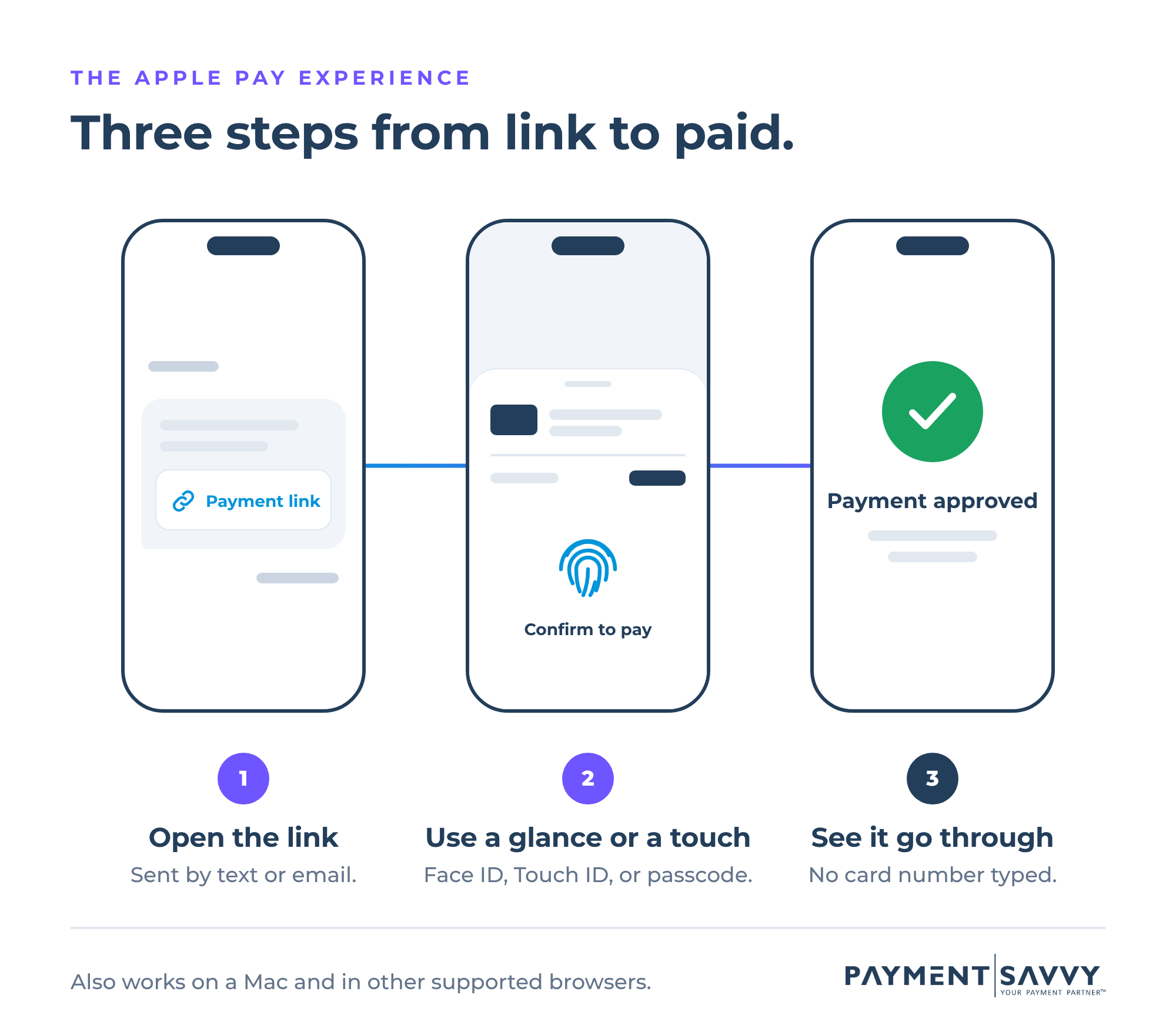
On an iPhone: The consumer opens the payment page, selects Apple Pay, and reviews the payment details on their screen. They authorize it with Face ID, Touch ID, or their device passcode, then see a confirmation once the payment is approved.
No card number to enter. No expiration date to remember. No searching for the wallet they left in another room.
On a Mac: Consumers can authorize with Touch ID on supported Macs. They can also use an eligible iPhone or Apple Watch, depending on the device and browser.
On other computers: Apple Pay now reaches beyond Safari. Supported websites can offer it in other browsers, including on Windows computers. The consumer scans a code with an eligible iPhone to pay. Scan-to-pay challenges the assumption that Apple Pay only works on a phone. Actual availability depends on the payment provider, browser, device, and website integration.
The common thread is familiarity. Consumers who already use Apple Pay for groceries and online orders don’t have to learn anything new when it’s time to resolve an account.
What actually happens behind the screen?
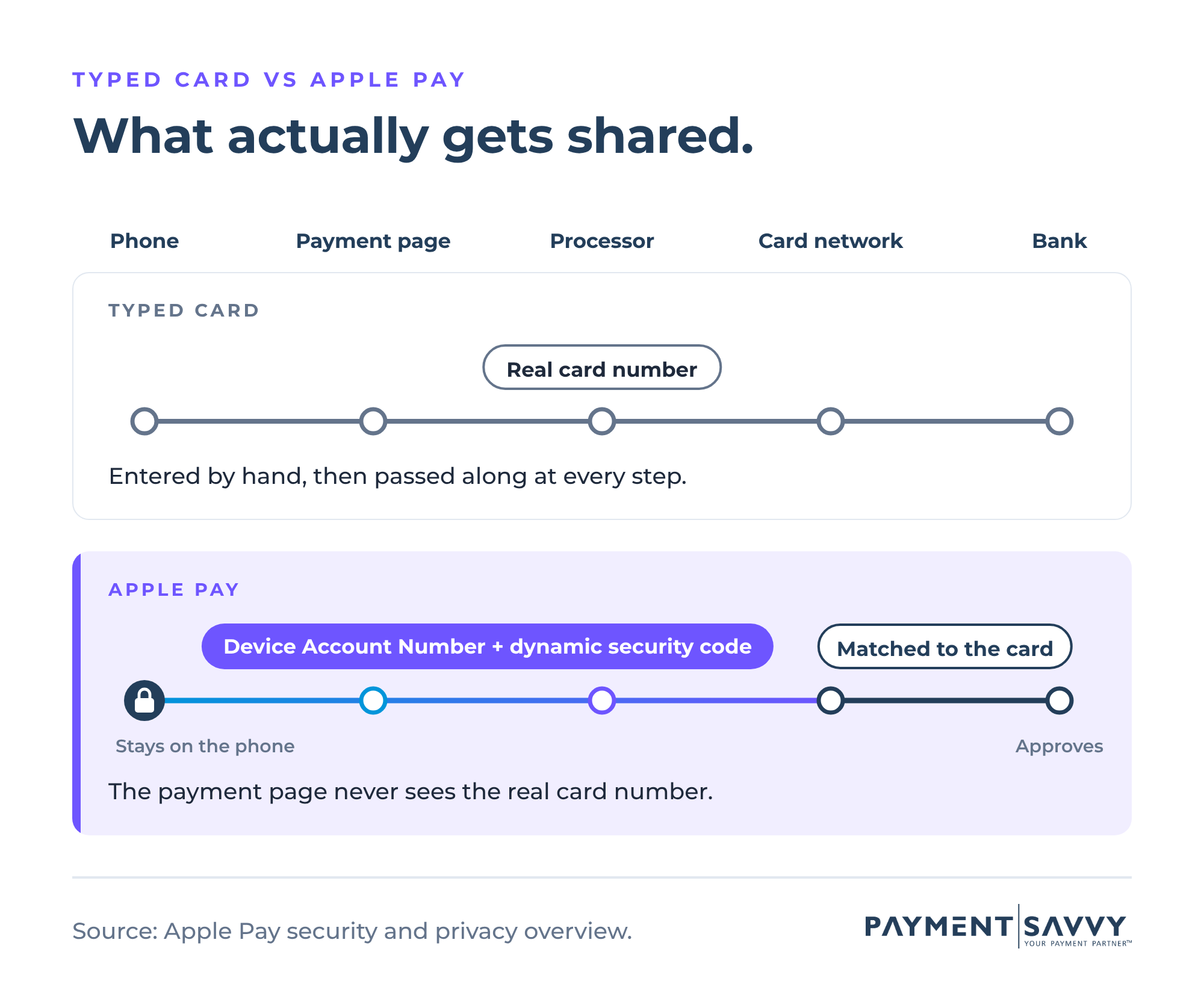
Apple Pay never sends the consumer’s actual card number to your payment page. For agencies handling sensitive financial information, how it does that matters as much as the convenience.
The process is called tokenization, and it’s common across card payments. When a consumer adds a card to Apple Wallet, the card is assigned a unique Device Account Number that’s stored securely on the device. Apple doesn’t keep the original card number.
When the consumer authorizes a payment, the device sends that Device Account Number along with a dynamic security code specific to that one payment. The payment processor and card network use this information to request approval from the consumer’s bank, which approves or declines the payment. Apple explains each safeguard in its Apple Pay security and privacy overview.
Tokenization reduces how much sensitive card information is exposed at checkout, while keeping the card payment process consumers already understand. It doesn’t remove every security concern or the need for good security practices. But it does add a useful layer of protection to the payment experience.
What Apple Pay’s fewer steps mean for collection agencies
Removing a few fields from a payment page might not sound like much. But collection agencies put real work into every payment, so the steps Apple Pay removes carry more weight.
Fewer entry errors. A mistyped card number or expiration date on a small screen can stop a payment the consumer meant to make. Apple Pay uses the card already stored in their Wallet, so there’s nothing to mistype.
A familiar option. KUBRA’s 2025 research found that 42% of consumers use digital wallets to pay bills, and 61% use them for everyday purchases. Not every consumer will choose Apple Pay, but paying with a phone is becoming a normal part of how people handle their bills.
A shorter path from yes to paid. In a 2025 holdback test, Stripe found that businesses offering Apple Pay saw an average 22.3% increase in conversion on eligible checkouts. Stripe’s number is a general commerce finding, not a collections recovery statistic. Agencies shouldn’t expect the same result just by adding a button. The broader lesson holds. Offering a preferred payment method can influence whether someone finishes checkout.
Can a consumer dispute an Apple Pay payment?
Yes. Apple Pay doesn’t eliminate chargebacks or guarantee that a disputed payment will be upheld. Consumers can still dispute card payments, and the outcome depends on the circumstances, the evidence, and card network rules.
Device authentication can provide helpful information about how a payment was authorized, but it doesn’t answer every question a dispute can raise. Agencies still need clear payment records and sound authorization practices. We wrote about some of those in our article on Visa’s Compelling Evidence 3.0.
Should every collection agency offer Apple Pay?
Not every consumer uses an iPhone, and not every payment calls for Apple Pay. It isn’t meant to replace card entry or ACH. It’s another way to give consumers a choice.
People don’t all prefer to pay the same way. Someone might happily type their card number on a desktop computer but reach for Apple Pay when a settlement link opens on their phone. Another consumer might prefer ACH or an automated phone payment. The goal is a payment experience that fits the people you serve.
For agencies weighing Apple Pay for collections, a few questions are a good place to start:
- How easy is it for a consumer to complete a payment from a phone?
- Which payment methods do our portal and payment links offer today?
- Are we asking consumers to type information that Apple Pay or Google Pay could fill in for them?
- Do we know where consumers run into problems or leave the payment process?
These questions are worth asking whether or not you accept Apple Pay today. They’re a quick way to see how well your payment experience supports recovery.
Offering Apple Pay to your consumers
At Payment Savvy, we’ve spent 15 years working with collection agencies and the challenges that come with getting payments across the finish line.
We offer Apple Pay and Google Pay because payment experiences should work for both sides. Agencies are working to recover outstanding balances, and consumers are trying to resolve them. That means familiar payment options, a straightforward process, and help making thoughtful decisions about the technology you use.
Exploring Apple Pay and Google Pay, or wondering whether your payment experience could work harder for your agency? We’d be happy to walk through the possibilities. Learn more about our payment processing solutions for collection agencies.
Because getting a consumer to say yes is hard enough. Completing the payment should be the easy part.
PAYMENT SOLUTIONS
FEATURED INDUSTRIES